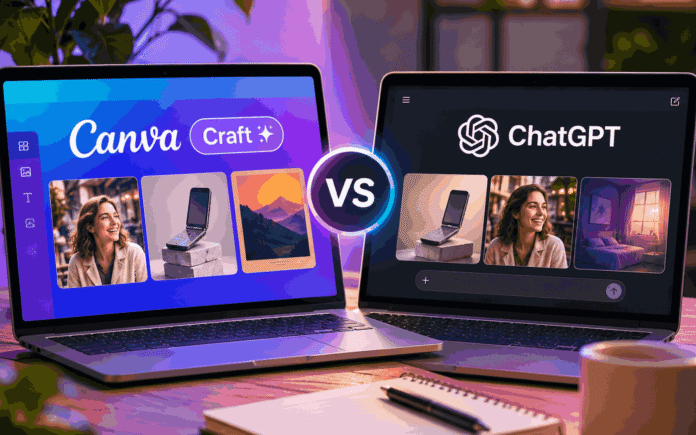
Canva Craft vs ChatGPT is becoming an interesting comparison for anyone who regularly creates images using artificial intelligence. Canva has entered the AI image generation market with its first in house model, Canva Craft, and it is making some bold claims about its capabilities. The company says its AI research team is among the world’s most advanced in image generation, ranking second only to OpenAI.
That is a significant claim, particularly when ChatGPT has already established itself as a popular choice for generating realistic photographs, creative illustrations and marketing visuals.
Canva Craft could have an advantage of its own, though. Unlike standalone AI image generators, it is designed to work alongside Canva’s existing design tools. This means users can generate images and incorporate them directly into posters, social media graphics, presentations and marketing materials without constantly switching between applications.
But does Canva’s new image generator actually compete with ChatGPT?
To find out, a comparison was conducted using the free versions of both platforms across five different image generation tests. The prompts covered product photography, workspace images, lifestyle photography, poster design and surreal artwork.
The results were surprisingly close, although ChatGPT managed to secure more wins overall.
Canva Craft vs ChatGPT: Five image generation tests compared
The comparison used identical prompts across both platforms. Canva Craft generated five image options for every request, with the first result selected for evaluation. ChatGPT generally produced one image, although it occasionally offered two variations.
The comparison focused on visual quality, realism, how accurately each tool followed the instructions and whether the finished images were suitable for actual creative projects.
Product photography: A close contest
The first test involved creating a premium product advertisement featuring a silver flip phone placed on a stone pedestal. The prompt also requested soft studio lighting and a clean beige background.
Both tools delivered impressive results.
Canva Craft and ChatGPT understood the brief and produced images that looked remarkably similar to professional product photography. The lighting, textures and overall presentation were convincing enough to work in a design mock-up or promotional concept.
However, there was one important limitation. Neither generated phone represented an actual commercial product. Anyone planning to use AI generated product photography for a real advertising campaign would need to provide more specific product references and instructions.
There was little separating the two results, making this round a draw.
Winner: Tie
Desk photography: ChatGPT gets ahead
The second prompt asked both tools to create a realistic overhead photograph of a wooden desk featuring a laptop, notebook, coffee cup, smartphone, pen and glasses.
This familiar image type appears in blog articles, workplace content, and professional social media posts.
Both generators produced usable compositions, but some differences became apparent when examining the details.
Canva Craft delivered more interesting lighting, which helped give its image a visually appealing appearance. However, the positioning of certain objects and the textures, particularly the coffee, made the result look slightly artificial.
ChatGPT produced a more convincing office environment. Its lighting was less visually dramatic, but the arrangement and overall appearance felt more natural.
For someone looking to create a realistic workspace image for a blog or professional website, ChatGPT had the advantage.
Winner: ChatGPT
Lifestyle photography: ChatGPT delivers more realism
The third test focused on a lifestyle photograph of a woman laughing outside a café on a sunny morning.
The idea was to see how well both tools could handle human subjects, natural expressions, lighting and realistic skin textures.
Initially, the results looked fairly similar. Both generators created a café setting with warm sunlight and a woman enjoying a candid moment.
However, closer inspection revealed a noticeable difference.
Canva Craft produced an image that looked somewhat artificial. The woman’s skin appeared overly smooth, while inconsistencies around her mouth made the expression less convincing.
ChatGPT performed better in this category. Its image featured more natural skin texture, a believable facial expression and fewer visible imperfections.
The difference was particularly noticeable when considering how the images might look in a professional blog article or editorial feature.
Canva’s result was usable for less demanding projects, but ChatGPT produced the more convincing photograph.
Winner: ChatGPT
Exhibition poster: ChatGPT creates the stronger design
For the fourth test, both AI tools were asked to design a modern exhibition poster titled “The Art of Disconnecting”.
The instructions called for bold typography, a clean layout and an image of a flip phone.
This was an interesting comparison because Canva already has a strong reputation as a design platform. Its existing tools allow users to create posters, promotional materials and social media graphics with considerable flexibility.
Both generators handled the text surprisingly well and produced similar colour palettes and visual concepts.
Canva Craft included more opportunities to display additional information, which could be useful for an actual event poster. However, the extra details made the composition look slightly crowded.
ChatGPT took a simpler approach. Its design felt more focused, with stronger visual impact and less unnecessary information.
Although both results were good, ChatGPT produced the more appealing overall design.
Winner: ChatGPT
Surreal artwork: Canva Craft takes the final round
The final test moved away from realistic photography and focused on creative interpretation.
The prompt asked both tools to create a dreamlike image of a flip phone opening into a childhood bedroom, with a nostalgic, surreal and slightly melancholic atmosphere.
Neither image was particularly impressive, but Canva Craft managed to interpret the concept more effectively.
Its result featured clearer visual elements and followed the original instructions more closely.
ChatGPT took a more abstract approach, producing an image that looked distorted and compressed in places. While the result had an unusual artistic quality, it did not communicate the intended concept as effectively.
Canva Craft therefore secured its first outright win in the comparison.
Winner: Canva Craft
Canva Craft vs ChatGPT: Free usage limits and pricing compared
Image quality is only one part of the comparison. For people who regularly generate visuals, the number of images they can create without paying is equally important.
This is where ChatGPT appears to offer better value for free users.
Canva provides every user with a monthly AI allowance. However, the free plan comes with a relatively small allocation. According to the comparison, users can expect to generate approximately five prompts per month.
There is an important detail here. Canva produces five image options for every prompt, meaning those five requests could technically provide up to 25 image options if all five results are counted.
The comparison’s author estimates that Canva’s free allowance translates to around 20 usable generated images per month.
Paid users receive considerably more access.
Canva Pro costs approximately $18 per month, or £13 in the UK and AU$20 in Australia. The plan provides roughly 200 monthly AI image generations according to the reported allowance.
The Business plan costs approximately $25 per month, or £18 in the UK and AU$28 in Australia, increasing the allowance to around 400 images.
ChatGPT’s free image generation allowance is more flexible. Depending on the account and current availability, free users can generally generate approximately five images per day.
That could provide considerably more opportunities to experiment than Canva’s monthly free allocation.
ChatGPT Plus costs $20 per month, £19.99 in the UK or AU$29.99 in Australia. However, image generation is not unlimited, and the available allowance can vary.
For users who primarily want to experiment with AI image generation, ChatGPT offers a more attractive free option based on these reported limits. Canva, meanwhile, becomes more interesting when image generation is part of a larger design workflow.
Final verdict: ChatGPT wins, but Canva Craft is worth watching
After five image generation tests, ChatGPT emerged as the overall winner, securing three outright victories and one shared result. Canva Craft managed one clear win, particularly with its interpretation of the surreal artwork prompt.
However, the results suggest that Canva is closer to ChatGPT than its position as a newcomer might imply.
Its product photography was convincing, its poster generation was competitive and its creative interpretation showed potential. The biggest weaknesses appeared in lifestyle photography and some of the finer visual details.
For everyday users, ChatGPT currently looks like the stronger choice for generating realistic images, particularly when human subjects and detailed compositions are involved.
Canva Craft has a different advantage. Its integration with Canva’s design environment makes it convenient for people who regularly create marketing materials, presentations, posters and social media content.
The free usage allowance is another important consideration. ChatGPT offers more opportunities for regular experimentation, while Canva’s monthly allocation could become restrictive for users who generate images frequently.
Ultimately, the better option depends on what you want to create. ChatGPT is the stronger all round image generator in this particular comparison, but Canva Craft could become an appealing alternative as its technology develops.
For now, Canva has made a promising start. It may not have overtaken OpenAI, but it has given users another worthwhile AI image generation option.
Follow TechBSB For More Updates