
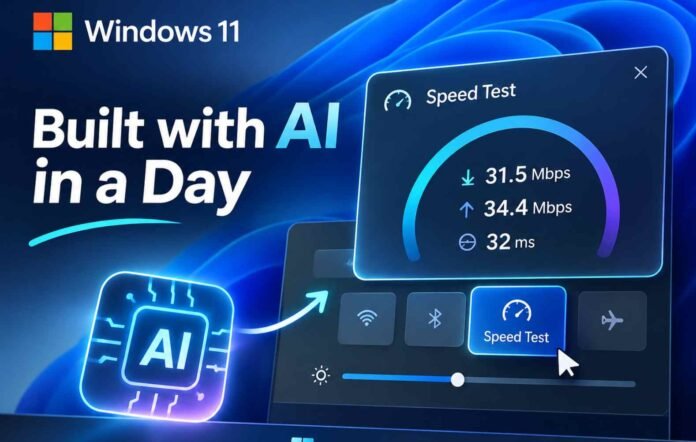
- Microsoft used an agentic AI workflow to develop a working prototype of Windows 11’s new Speed Test feature in just one day.
- A human designer guided the AI process, while Microsoft’s engineering teams and partners handled the final integration.
- The new feature brings internet speed testing directly into Windows 11 Quick Settings without opening a web browser.
- Microsoft could use the same development approach to modernise applications such as Clipchamp, Weather, MSN News and Teams.
Microsoft is increasingly turning to artificial intelligence to speed up Windows development, and its latest experiment offers an interesting example of what that approach can achieve. The company has revealed that Windows 11’s new internet Speed Test feature started as an idea and became a working prototype in just one day, with an AI agent handling much of the design and development work under human supervision.
The details were shared by Marcus Ash, Microsoft’s Windows Design and Research lead, who explained how the feature came together following feedback from Windows users. Many wanted a more convenient way to check their internet connection without being sent to a browser. Microsoft took that feedback seriously, and the result is a new Speed Test experience integrated into Windows 11’s Quick Settings panel.
According to Ash, Windows president Pavan Davuluri asked Diego Baca, Microsoft’s Vice President of Product Design, to explore the idea. Baca reportedly produced a working prototype within a day.
What makes the story particularly interesting is how the prototype was developed. Ash said an agentic AI workflow drove the design and building process, with a person guiding the work during their spare time.
That is a notable example of AI being used as a practical development tool rather than simply generating concepts or producing code without direction. The human contribution remained important, while the AI workflow helped accelerate the process.
Microsoft has not disclosed which AI models or development tools were involved, nor has it explained precisely how much of the final code was generated by AI. The company also worked with its connectivity team and external partners to bring the feature into Windows. The speed testing itself is powered by Ookla’s Speedtest technology.
The distinction matters. Producing a prototype in a day is impressive, but turning it into a dependable Windows feature requires engineering, testing and integration. AI helped shorten the early development process, while people remained responsible for guiding and delivering the experience.
Windows 11’s New Speed Test Is a Small Feature With Big Potential
The new Speed Test option is a welcome improvement over the previous experience. Until now, selecting the internet speed testing shortcut in Windows 11 would take users to a browser, where they could run a test through a web service. It was functional, but hardly an integrated Windows experience.
The new implementation brings the process directly into Quick Settings. Users can launch a test through the Speed Test tile, the Wi-Fi flyout or the network icon in the taskbar.
Instead of switching applications, Windows displays the results in a dedicated flyout. This makes checking download speed, upload speed and ping considerably more convenient.
The feature appeared in Microsoft’s October 23 experimental Windows Insider build. However, some users may need to enable the relevant feature flag before they can access it.
In testing reported by Windows Latest, the feature returned download speeds of 31.5 Mbps, upload speeds of 34.4 Mbps and a ping of 32 milliseconds. The test completed in less than 30 seconds.
More importantly, the experience reportedly worked reliably even when the taskbar was moved to different edges of the display. It also maintained a consistent appearance in both light and dark modes.
This might not sound like a major Windows upgrade, but small improvements like this can make an operating system feel more thoughtfully designed. Users should not have to open a browser for something that could be handled directly by the operating system.
The bigger question is whether Microsoft can apply the same thinking to other parts of Windows 11. There are plenty of applications and legacy interfaces that could benefit from faster development and a more consistent native experience.
WinUI and AI Could Finally Help Modernise Windows 11
AI alone will not solve Windows 11’s long standing design and performance problems. Microsoft also needs to improve the underlying development platform and make sure its native applications have the tools required to compete with modern web technologies.
That is where WinUI comes into the picture.
Microsoft’s Windows App SDK and WinUI framework have faced criticism over missing features and development limitations. Basic capabilities such as data tables, charts and improved pen support have taken considerable time to arrive.
The company has started addressing some of these gaps. TableView and Chart capabilities have appeared in experimental releases of Windows App SDK 2.5.4, although Microsoft has indicated that they are not yet ready for production applications.
There are also signs that Microsoft wants to replace more of Windows’ older interfaces with modern WinUI 3 experiences.
The Properties dialog, Run dialog, AutoPlay interface and Print Management are among the areas receiving attention. Microsoft has also been working on a redesigned Windows Search experience built on WinUI 3, with a broader rollout expected following its initial Insider release.
These changes are important because Windows 11 still contains interfaces that look and behave as though they belong to much older versions of Windows. Modernising them could improve consistency, performance and usability.
AI could make this transition considerably faster by helping designers and developers build prototypes, identify problems and implement code changes without waiting through lengthy development cycles.
However, Microsoft’s own applications should be among the biggest beneficiaries.
Clipchamp, for example, offers a useful collection of video editing tools, but its web based experience can feel sluggish. A properly optimised native application could make it a much more attractive option for everyday creators.
The Weather app is another obvious candidate. Previous testing cited by Windows Latest found that it could consume more than 1.2GB of RAM while idle. That is an uncomfortable amount of memory for an application that primarily displays weather information.
Microsoft Teams also deserves attention. Its resource consumption has been a recurring complaint, with reported testing showing nearly 1GB of RAM usage on a fresh installation without active conversations.
MSN News could benefit from a similar overhaul. A lightweight native application with a clean interface would offer a more straightforward way to follow news without relying on another resource intensive web experience.
Microsoft has an opportunity to rethink how these applications are built and maintained. AI could help reduce development time, but the real objective should be better software, not simply more software produced in less time.
The new Speed Test feature is an encouraging demonstration of that possibility. It shows how a small team, guided by human judgement and supported by AI agents, can move an idea towards a working product remarkably quickly.
Still, the real test will be what Microsoft does next. Windows users need applications that launch quickly, consume fewer resources and feel genuinely integrated into the operating system.
If Microsoft can bring that level of attention to Clipchamp, Weather, Teams and other built in applications, AI could become one of the most useful tools in Windows development. The goal should not be to replace human developers. It should be to give them more time to build the features people actually want.
Follow TechBSB For More Updates