
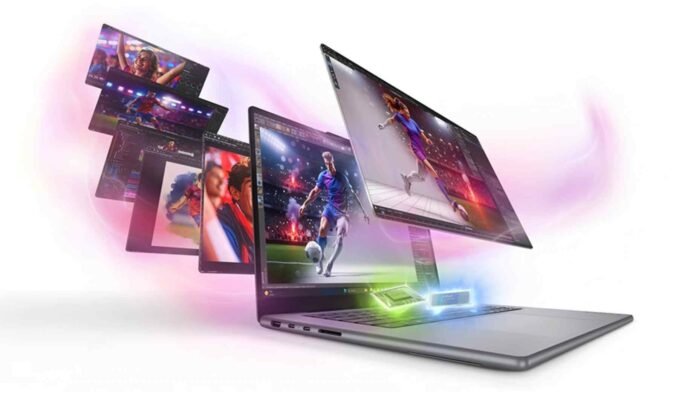
- The Lenovo Yoga Pro 7i features a 15 inch 2.5K OLED touchscreen with a smooth 165Hz refresh rate.
- Its Intel Core Ultra 9 processor and Nvidia RTX 5060 graphics support demanding creative workloads.
- Practical ports, a comfortable keyboard and a portable design make it suitable for mobile professionals.
- Starting at $2,599.99, it suits serious creators, while desk based users may prefer the larger Yoga Pro 9i.
The Lenovo Yoga Pro 7i Gen 11 Aura Edition brings together a high quality OLED display, dedicated graphics and strong processing power in a laptop designed for people who need to create wherever work takes them. With a 15 inch screen, an Intel Core Ultra 9 processor and Nvidia GeForce RTX 5060 graphics, it aims to deliver the performance of a creative workstation without the bulk of a larger laptop.
Starting at $2,599.99 in the US and £2,430 in the UK, this machine sits firmly in the premium laptop category. It is aimed at photographers, video editors, content creators and professionals who want a capable computer for demanding projects while retaining the freedom to work from different locations.
According to TechRadar’s review, the Yoga Pro 7i stands out for its vivid display, smooth refresh rate, practical port selection and dependable performance. Its 15 inch form factor also makes it easier to carry than the larger Yoga Pro 9i, although buyers who need more screen space may prefer the bigger model.
Lenovo Yoga Pro 7i Gen 11 Aura Edition: Price and Specifications
The Yoga Pro 7i Gen 11 Aura Edition is available in multiple configurations, allowing buyers to choose a setup that suits their workload and budget. The reviewed configuration featured an Intel Core Ultra 9 processor and RTX 5060 graphics, with options for up to 64GB of RAM and a 2TB SSD.
Here are the key specifications and features highlighted in the review.
- Display: 15 inch, 2.5K OLED touchscreen with a 165Hz refresh rate.
- Processor: Intel Core Ultra 9, depending on configuration.
- Graphics: Nvidia GeForce RTX 5060 dedicated GPU.
- Memory and storage: Configurations offering up to 64GB RAM and 2TB SSD.
- Display technology: HDR True Black 1000, with reported peak brightness of up to 1,100 nits.
- Colour support: Coverage for sRGB, P3 and Adobe RGB colour spaces.
- Design: Luna Grey finish with a portable chassis intended for mobile professionals.
- Input: Comfortable keyboard, responsive trackpad and support for pen based interaction through the trackpad.
The starting price is $2,599.99, while the review unit cost approximately $2,700. The Yoga Pro 9i Gen 11 Aura Edition is the larger alternative, with a comparable configuration costing around $3,000 according to the review. That makes the Pro 7i an interesting option for buyers who want similar core hardware in a smaller package.
However, the price remains a major consideration. This is a premium purchase, and casual users who mainly browse the web, write documents or stream videos are unlikely to need this much computing power.
Display, Design and Everyday Experience
The 15 inch OLED display is one of the biggest attractions of the Lenovo Yoga Pro 7i. Although its resolution falls short of 4K, the panel delivers sharp visuals, rich colours and smooth motion. Its 165Hz refresh rate also makes scrolling, moving between applications and navigating the desktop feel noticeably fluid.
For photographers and video editors, colour reproduction is particularly important. The display’s stated coverage of sRGB, P3 and Adobe RGB makes it suitable for a range of creative tasks, including photo adjustments, video review and visual content production. Its high peak brightness rating and HDR capabilities add to its appeal when working with compatible content.
Resolution alone does not determine display quality. A well calibrated 2.5K OLED panel can offer a compelling experience without the extra demands associated with a 4K screen. For many creators, the combination of contrast, colour accuracy and refresh rate will matter more than having the highest possible pixel count.
The laptop’s size is another important part of its appeal. A 15 inch display provides more working room than a typical 13 or 14 inch laptop, yet the device remains more manageable than a larger 16 inch model. It should fit into many full size laptop backpacks, making it practical for people who regularly move between home, the office and other workspaces.
Lenovo has also paid attention to usability. The keyboard is comfortable for extended typing sessions, while the trackpad provides a generous surface for navigation and drawing related tasks. The trackpad’s drawing functionality may require some adjustment for first time users, but it can become more intuitive with practice.
Port selection is another welcome feature. Instead of relying entirely on USB C connections, the Yoga Pro 7i offers a more practical range of ports for everyday professional use. This reduces the need to carry adapters when connecting accessories and other equipment.
Performance, Graphics and Final Verdict
The Intel Core Ultra 9 processor and Nvidia GeForce RTX 5060 graphics give the Yoga Pro 7i the hardware needed for demanding creative applications. The combination is intended to handle workloads such as photo editing, video production, multitasking and graphics accelerated tasks.
During testing, the reviewer used the laptop for content approval, light photo editing and video editing. The system also handled a workload involving 22 lines of a security system without reported performance problems. While this is not a substitute for comprehensive benchmarks across professional applications, it offers an indication of how the machine performed in the reviewer’s day to day work.
The dedicated GPU is especially relevant for creators whose applications benefit from hardware acceleration. Video editing, effects processing and other graphics intensive workloads can make use of the additional processing capability, although actual performance will depend on the software, project complexity and selected configuration.
The OLED screen complements that hardware by providing a high quality workspace for visual tasks. Meanwhile, the comfortable keyboard and smooth trackpad make the laptop suitable for routine office work, writing and long working sessions.
There are still a couple of compromises to consider. The display is not 4K, which may matter to professionals who specifically require that resolution. The 15 inch size also occupies a middle ground: it is more portable than the 16 inch Yoga Pro 9i, but users who prioritise compactness may still prefer a 14 inch laptop.
The price is another factor. At more than $2,500, buyers should consider whether they will regularly use the processor, dedicated graphics and colour focused display. Those who spend most of their time at a desk may find the larger Yoga Pro 9i worth comparing, particularly if the additional screen space improves their workflow.
Overall, the Lenovo Yoga Pro 7i Gen 11 Aura Edition is a compelling choice for mobile creators who need strong performance, a premium display and practical connectivity in a reasonably portable design. It does not attempt to be the smallest laptop or offer the highest screen resolution available. Instead, it focuses on combining the features that matter most to people who create content on the move.
Follow TechBSB For More Updates