
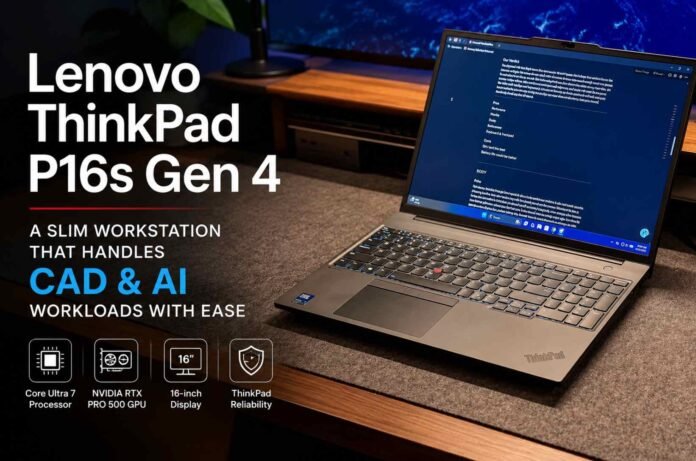
- Slim and relatively lightweight for a powerful 16 inch mobile workstation.
- Core Ultra 7 and RTX PRO 500 hardware handle demanding productivity, CAD and AI workflows well.
- Excellent ThinkPad build quality, keyboard and business focused features improve everyday usability.
- High price and average battery life are the main compromises.
The Lenovo ThinkPad P16s Gen 4 takes an interesting approach to the mobile workstation formula. It delivers a large 16 inch display, business focused durability and professional grade hardware without becoming the kind of oversized machine that feels permanently tied to a desk.
That balance is its biggest strength. This is still a substantial laptop, but Lenovo has managed to make it surprisingly practical for professionals who regularly move between offices, client sites and remote workspaces.
The configuration reviewed combines an Intel Core Ultra 7 processor with Nvidia’s RTX PRO 500 Blackwell GPU, giving the P16s Gen 4 enough muscle for demanding productivity, CAD and AI assisted workflows. It is expensive, and the graphics performance will not satisfy users with the most intensive rendering requirements, but for its intended audience, it offers a compelling mix of portability and professional capability.
Design and build quality
The ThinkPad design has changed gradually over the years, and the P16s Gen 4 continues that familiar approach. It looks unmistakably like a ThinkPad, with a restrained business focused exterior rather than a flashy workstation aesthetic.
That familiarity works in its favor. The machine feels solid and purpose built, with the kind of construction expected from a laptop designed for daily professional use. Lenovo has also included MIL STD 810H tested durability and a spill resistant backlit keyboard, reinforcing the workstation credentials.
Despite its 16 inch footprint, the P16s Gen 4 is slim enough to be carried more comfortably than many traditional mobile workstations. It will still require a reasonably large backpack, but it does not feel as cumbersome as the specifications might suggest.
The keyboard remains one of the strongest parts of the ThinkPad experience. Long writing sessions are comfortable, while the large trackpad provides plenty of room for everyday navigation. The familiar TrackPoint is also present for users who prefer Lenovo’s distinctive pointing stick.
Practical features such as a privacy shutter, human presence detection and a useful selection of ports make the machine feel designed around real working environments rather than showroom appeal.
Performance for AI, CAD and serious productivity
The ThinkPad P16s Gen 4 is at its best when handling demanding professional workloads that rely heavily on CPU performance and multitasking.
During intensive day to day use, the system remains responsive when several AI based services and productivity tools are running simultaneously. Managing multiple browser sessions, research tasks, communication platforms and AI workflows can place significant pressure on a laptop, particularly when memory usage begins to climb. The P16s handles this type of workload confidently.
That makes it particularly appealing to developers, researchers and professionals who spend their days switching between applications rather than focusing on a single task.
The RTX PRO 500 Blackwell GPU adds another layer of capability. It is suitable for professional graphics workloads and can support CAD and lighter 3D rendering tasks, although it is not designed to compete with the most powerful workstation GPUs.
This distinction matters. If your work involves constant high resolution video editing or extremely demanding 3D rendering, a larger and more powerful workstation may still be the better choice. The P16s Gen 4 is more convincing for users who need professional graphics capability without carrying a much heavier desktop replacement.
The optional OLED display is another attractive configuration choice. The large screen is especially useful for spreadsheets, coding, research and multitasking, giving users enough space to work without immediately reaching for an external monitor.
A workstation that can leave the desk
Portability is where the P16s Gen 4 becomes more interesting.
Most powerful 16 inch workstations make compromises when it comes to mobility. They may deliver exceptional performance, but their weight and size can make regular travel tiring. Lenovo has avoided some of that problem here.
The P16s Gen 4 can realistically fit into a standard backpack and works comfortably in places where larger laptops often become awkward. It is still a 16 inch machine, so users looking for the smallest possible travel companion should consider a 14 inch alternative, but for a workstation class laptop, the balance is impressive.
The keyboard is comfortable enough for extended work sessions, while the microphones are capable of handling calls and meetings in typical working environments. That makes the laptop suitable for the increasingly common work from anywhere routine.
Battery life is less impressive. Given the hardware inside and the size of the display, this is not entirely surprising, but users who expect all day operation away from a charger may need to manage their workload carefully.
Final verdict
The Lenovo ThinkPad P16s Gen 4 succeeds because it understands that not every professional needs the largest and most powerful mobile workstation available.
Instead, it offers a more balanced package. You get a strong processor, professional Nvidia graphics, a large display and the durability associated with the ThinkPad brand, all inside a machine that remains practical enough to carry regularly.
The biggest obstacle is the price. This is a premium workstation, and buyers should be certain they need its professional hardware before investing. The RTX PRO 500 GPU is also capable rather than exceptional, meaning serious rendering specialists may want more graphics power.
For developers, CAD users, engineers and professionals running demanding CPU heavy workloads, however, the P16s Gen 4 makes a strong case for itself. It delivers workstation capability without forcing you to treat portability as an afterthought.
Follow TechBSB For More Updates