
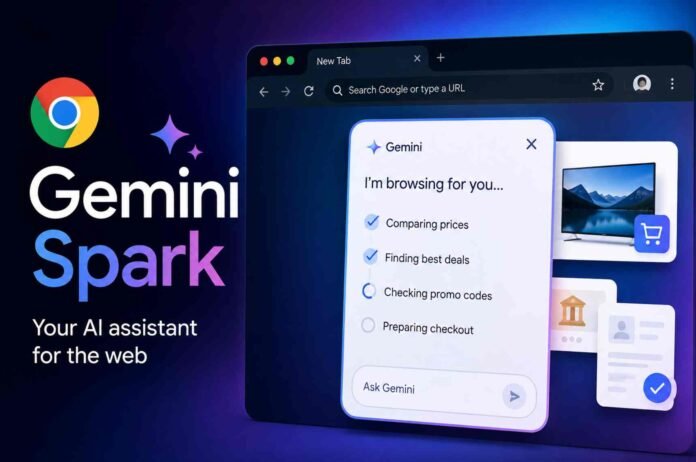
- Gemini Spark integrates directly into Chrome and performs browsing tasks instead of only answering questions.
- It can compare prices, organize trips, fill forms, and prepare purchases while asking approval before important actions.
- The AI works in the background and reduces repetitive browsing without taking control away from users.
- Gemini Spark shows how browser based AI agents can make everyday online activities faster and more efficient.
Google has spent years adding artificial intelligence to its products, but many of those features have felt more like smart assistants than true digital helpers. Gemini Spark changes that approach in a meaningful way. Instead of only answering questions or suggesting actions, it actively carries out tasks inside Chrome while keeping users in control of important decisions.
Integrated directly into the Chrome browser, Gemini Spark introduces a different way of interacting with the web. It can browse websites, compare products, fill forms, organize information, and prepare purchases without requiring users to constantly switch between tabs. The experience feels less like chatting with an AI and more like working alongside a capable assistant that understands what needs to be done.
What makes the feature stand out is how naturally it fits into everyday browsing. Rather than interrupting your workflow, Spark quietly handles repetitive actions while asking for permission only when sensitive information or payments are involved.
Gemini Spark Turns Chrome Into an Active Assistant
Getting started with Gemini Spark is fairly straightforward, although there are a few requirements. Users need the latest version of Google Chrome on Windows or macOS, a personal Google account, and an active Google AI Pro or Google AI Ultra subscription. Safe Browsing must also be enabled using either Standard Protection or Enhanced Protection before the feature becomes available.
Once activated through Chrome settings, Spark appears within the Ask Gemini panel. Users simply describe the task they want completed and Spark presents a step by step plan before taking any action. This added transparency helps users understand exactly what the AI intends to do before it begins working.
Unlike traditional AI chatbots that only provide suggestions, Spark can continue browsing websites on your behalf. It moves between pages, collects information, compares options, and completes repetitive actions while running in the background. Even if Chrome is closed, Spark continues processing supported tasks until it reaches a stage where user approval is required.
That approach makes the experience feel much closer to delegating work than simply receiving advice.
Shopping and Planning Become Faster With Less Effort
One of the strongest demonstrations of Gemini Spark is comparison shopping. Instead of manually checking several retailers for the same product, users can assign Spark a complete shopping task.
For example, asking Spark to compare prices for a 65 inch television across multiple online stores produces far more than a simple price list. The AI visits retailer websites, checks available offers, searches for discounts, evaluates pricing, and determines which option offers the best value.
Once it identifies the preferred purchase, Spark adds the item to the shopping cart but deliberately pauses before completing payment. This safeguard ensures users remain responsible for every financial decision while avoiding the tedious research leading up to it.
The same intelligent workflow applies to travel and event planning. Organizing a family outing normally involves opening maps, checking attraction schedules, reading restaurant reviews, and comparing booking options across several websites. Spark handles those steps automatically by building a practical itinerary, checking travel times, finding suitable restaurants, and preparing reservations before requesting final confirmation.
Instead of replacing user choice, Spark reduces the amount of repetitive browsing needed to reach a decision.
Everyday Administrative Tasks Could Benefit Most
Perhaps the most practical use for Gemini Spark is handling online forms and administrative paperwork.
Whether applying for memberships, completing registrations, or filling application forms, users often spend more time entering the same personal details repeatedly than actually reviewing the information. Spark simplifies this process by using information already stored within a user’s Google account, provided permission has been granted.
In one example, Spark completed a library card application by automatically entering contact information, mailing address, and other personal details. After finishing every required field, it stopped before submitting the application, allowing the user to verify everything before the final click.
This cautious approach is especially important for documents involving healthcare, insurance, education, or government services where accuracy matters. Rather than blindly submitting information, Spark treats users as the final decision makers.
The result is a system that saves time without removing human oversight.
A More Practical Direction for Consumer AI
Gemini Spark represents a noticeable shift in how artificial intelligence is being integrated into everyday software. Most AI assistants still focus on generating answers, summarizing information, or responding to prompts. Spark extends beyond conversation by completing genuine browser based tasks.
Its greatest strength is not flashy technology but practical usefulness. It removes much of the repetitive clicking, searching, copying, and typing that often consumes time during routine online activities. At the same time, Google has built clear approval checkpoints into the experience so users remain fully aware of purchases, payments, and important submissions.
While Spark will not automate every aspect of browsing, it demonstrates how AI can become a reliable productivity tool instead of simply another chatbot. For people who regularly compare products, organize travel, complete online forms, or manage multiple websites at once, the feature has the potential to save meaningful time every day.
If this direction continues to evolve, browser based AI agents could become one of the most practical uses of artificial intelligence available to everyday users.
Follow TechBSB For More Updates