
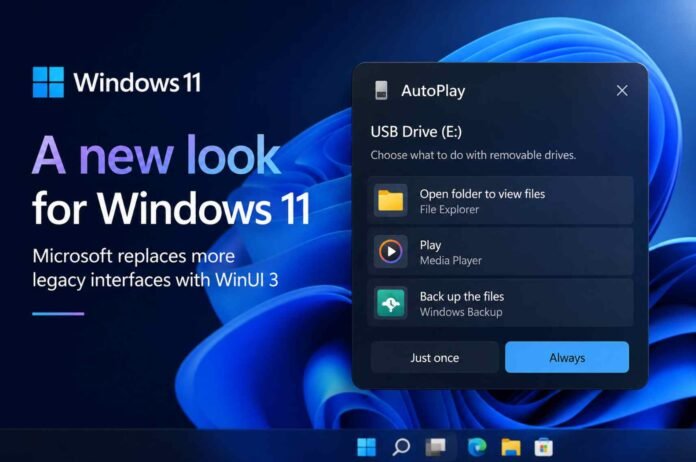
- Windows 11 is testing a new WinUI based AutoPlay dialog with a cleaner and more modern design.
- AutoPlay will move from the top right corner into a proper central dialog with larger icons and improved spacing.
- Microsoft is also redesigning the Properties dialog as part of a wider effort to replace older Windows interfaces.
- More Windows 11 changes could arrive from September 2026, including improvements to Search and other parts of the Windows shell.
Windows 11 is getting another visual overhaul, and this time Microsoft appears to be going after some of the operating system’s oldest interface elements.
The company has been gradually moving Windows 11 towards its Fluent Design language, but plenty of dialogs and pop ups still look like they belong to much older versions of Windows. That could finally be changing as Microsoft expands its use of WinUI 3 beyond individual apps and into more parts of the Windows shell.
The latest example is the AutoPlay dialog, which is being redesigned in preview builds with a much more modern interface. It is a small change on the surface, but it points to a much bigger shift in how Microsoft wants Windows 11 to look and behave.
Windows 11 is giving AutoPlay a much needed makeover
AutoPlay is one of those Windows features that most people probably use without thinking about it. Connect a USB drive, smartphone or another media device and Windows can ask what you want to do with it.
The problem is that the current AutoPlay interface looks noticeably out of place in Windows 11. Its compact flyout appears in the top right corner of the desktop and has retained much of the visual language introduced during the Windows 8 era.
That design made more sense when Windows was being built around touchscreens and tablet style interactions. On a modern desktop, however, it feels like a leftover from another generation of Windows.
Microsoft is now testing a completely redesigned AutoPlay experience based on WinUI. Instead of appearing as a small notification style panel in the corner, the new interface opens as a proper dialog in the centre of the screen.
The visual changes are immediately noticeable. The redesigned window has rounded corners, larger icons, more generous spacing and a darker appearance that fits much better with the rest of Windows 11. There is also support for light mode, so the interface does not feel tied to a single theme.
More importantly, Microsoft is improving the functionality at the same time.
The new AutoPlay dialog lets users choose between Always and Just once. That means you can tell Windows to open a connected device in File Explorer every time, or simply make that choice for the current connection.
It is a small addition, but it addresses one of the frustrations with the existing interface while making the overall experience feel more deliberate.
Microsoft is targeting more legacy Windows dialogs
AutoPlay is unlikely to be an isolated redesign.
Microsoft is also working on a new version of the Properties dialog, the window that appears when you right click a file or folder and select Properties. The existing interface is another example of Windows carrying older design components alongside its newer Fluent based interface.
The new Properties experience is being rebuilt around WinUI and already appears in preview testing. It is still an early implementation, though, and some of the current design choices look unfinished.
There is noticeably more padding around elements, which makes the dialog feel larger than necessary. That is not necessarily a sign of the final design, as Microsoft has plenty of time to refine the spacing and layout before a wider release.
The important part is that these changes suggest Microsoft is no longer treating WinUI as something reserved mainly for modern Windows applications.
The company has previously acknowledged that WinUI has performance challenges, but it has also made clear that it remains committed to the framework. The broader plan appears to involve improving its performance while using it across more of the Windows shell.
That could eventually mean fewer moments where Windows 11 suddenly switches from a polished modern interface to an old looking dialog.
A bigger Windows 11 refresh could be on the way
The timing is also interesting.
Microsoft has made plenty of promises about improving Windows over the years, only for some of those plans to disappear during reorganisations or changes in priorities. This latest push feels somewhat different because several of the proposed changes are already appearing in preview builds.
The AutoPlay redesign is one example. The modern Properties dialog is another.
Other changes are also expected as Microsoft continues its broader Windows 11 refresh. The company is reportedly working on features such as a movable taskbar and a less cluttered Windows Search experience without Bing integration.
Some of these changes are expected to begin appearing more widely from September 2026, although Microsoft’s preview programme means features can still change or be delayed before reaching the stable version of Windows 11.
For users, the bigger story is not really the AutoPlay dialog itself. It is the possibility that Microsoft is finally addressing the inconsistent design language that has followed Windows for years.
Windows 11 was launched with a promise of a more coherent visual experience, but the operating system has continued to contain legacy components from Windows 7, Windows 8 and earlier versions. Replacing those elements will not happen overnight, but the latest preview work suggests Microsoft is actively moving in that direction.
If Microsoft can combine the visual improvements with better performance, the result could be one of the more meaningful Windows 11 changes in years. A modern interface is useful, but a modern interface that also feels fast and consistent would be far more valuable.
Follow TechBSB For More Updates