
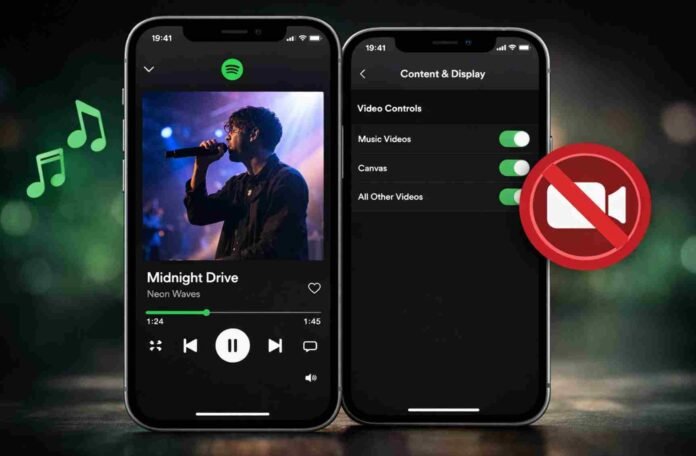
- Spotify is rolling out new controls to manage video content across the app
- Family Plan managers get access first, wider rollout follows this month
- Users can disable music videos, Canvas, and other video formats
- The update focuses on restoring a smoother, audio-first experience
Spotify is making a long overdue change to how video content behaves inside its app, and for many listeners, it could dramatically improve the overall experience. The company has begun rolling out new video control settings globally, giving users the option to decide exactly how much visual content they want to see or ignore.
The update arrives with a clear goal in mind: restoring Spotify’s identity as an audio-first platform. Over the years, the app has steadily layered in music videos, looping Canvas visuals, video podcasts, and short-form clips. While some users appreciate the added richness, others have found it distracting and, at times, disruptive.
Now, Spotify is addressing that divide by handing control back to listeners.
A phased rollout with Family Plan users first
The rollout has already begun, but not everyone will see the feature immediately. Spotify is starting with Family Plan managers, allowing them to control video visibility across all accounts linked to the plan. This marks a notable expansion, as previously these controls were limited to accounts for children under 13.
With this update, Family Plan managers can toggle video content on or off for everyone, regardless of age. It is a subtle but important shift that acknowledges how different users within the same household may want very different listening experiences.
Spotify has confirmed that the feature will expand to Premium and free users across Individual, Duo, Student, and Family tiers later this month. Once fully rolled out, every user will have access to the same level of customization.
How the new controls actually work
The new settings are easy to find and use. Inside the app’s settings menu, users can navigate to the “Content and display” section. From there, several toggles allow users to disable different types of video content.
These include music videos, Canvas loops, and a broader category labeled “All other videos.” This final category covers video podcasts, vertical clips, and other creator-led visuals that appear throughout the app.
The flexibility here is key. Rather than forcing users into an all-or-nothing choice, Spotify allows granular control. You can keep subtle visuals like Canvas while disabling full-length music videos, or remove everything for a purely audio experience.
For listeners who primarily use Spotify as a background music player, this could significantly reduce friction and make playback feel more seamless.
Fixing a clunky video experience
Spotify’s push into video has not always landed smoothly. One of the biggest complaints has been how awkward the transition between audio and video can feel. Switching to a music video often requires manual input, and even then, the app resets to audio when the next track plays.
There is currently no autoplay option for music videos, which makes continuous video listening feel incomplete. While the new controls do not directly solve this limitation, they do offer a workaround by letting users opt out of video entirely.
In many ways, this update feels like Spotify acknowledging that its video ambitions have not fully aligned with user expectations. Rather than doubling down, the company is choosing to refine the experience and let users decide what works best for them.
A step back toward what Spotify does best
For longtime users, this change will likely be welcomed. Spotify built its reputation on delivering a smooth, reliable music streaming experience.
By introducing video controls, Spotify is not removing features but reframing them as optional enhancements rather than core elements. That distinction matters.
Listeners who enjoy music videos and visual content can still access them, while those who prefer a clean, distraction-free interface can tailor the app to suit their habits.
It is a practical update, but also a symbolic one. It suggests Spotify is listening to feedback and willing to recalibrate when necessary.
Follow TechBSB For More Updates

