
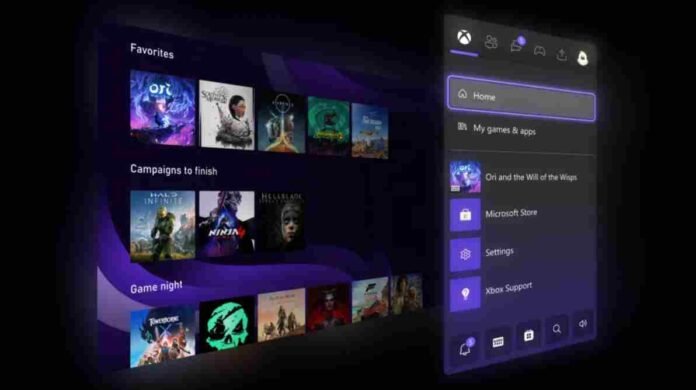
- Full UI color customization with adjustable sliders is now available
- Home screen groups expanded from 2 to 10 for better organization
- Quick Resume can now be disabled for individual games
- New profile view shows five most recent badges
Microsoft is rolling out one of its most meaningful Xbox dashboard updates in years, and it’s clearly aimed at giving players more control over how their console looks and behaves. Currently available to Xbox Insiders, the update introduces a range of customization and usability improvements that go beyond surface-level tweaks.
The headline feature is the long-awaited expansion of personalization options. Players are no longer restricted to a small set of preset themes. Instead, the updated interface allows full control over UI colors through adjustable sliders.
In practical terms, that means you can finally tailor your Xbox dashboard to match your personality or setup. Whether that means a bold neon pink, a subtle pastel tone, or something in between, the system now supports it.
It is a simple change on paper, but it significantly alters how personal the Xbox experience can feel. Console interfaces often become background noise, but this update makes the dashboard feel like something you actively design rather than passively accept.
Better Organization with Expanded Groups
Beyond aesthetics, Microsoft is also addressing a long-standing limitation in how players organize their game libraries. Previously, users could only create up to two groups on the home screen, which felt restrictive given the size of modern digital libraries.
With this update, that limit jumps to ten groups. It is a substantial improvement that makes it far easier to keep things tidy. You can now separate multiplayer titles, single player campaigns, backlog games, or even genre-specific collections without running out of space.
This change will be particularly useful for players who rely heavily on Game Pass or own large digital collections. Instead of endlessly scrolling or searching, your most-used titles can now be structured in a way that reflects how you actually play.
Quick Resume Gets Smarter
Quick Resume has been one of the standout features of the newer Xbox consoles, allowing players to jump back into games almost instantly. However, it has not always worked perfectly, especially with online or live service games.
This update introduces a much-needed level of control. Players can now disable Quick Resume on a per-game basis. That might sound like a small tweak, but it solves a real frustration. Games that require constant server connections or frequent updates often behave unpredictably when resumed from a suspended state.
By allowing users to opt out for specific titles, Microsoft is refining the feature rather than forcing a one-size-fits-all solution. It shows a more flexible approach to system design, where the player has the final say.
Subtle Social Enhancements
In addition to the bigger changes, the update also includes smaller quality-of-life improvements. One of these is the ability to view a player’s five most recently unlocked badges directly from their profile.
While not a headline feature, it adds a bit more depth to the social experience. Achievements and badges are a core part of the Xbox ecosystem, and making them more visible encourages friendly competition and engagement among players.
It is the kind of addition that may go unnoticed at first but contributes to a more connected and dynamic community over time.
Rolling Out in Phases
As with most Xbox updates, this one is starting with Xbox Insiders before expanding to the broader user base. That phased rollout allows Microsoft to gather feedback and ensure stability before pushing it to millions of players worldwide.
Importantly, while Quick Resume improvements are tied to newer hardware, most of the customization and organization features are expected to reach older Xbox One consoles as well. That ensures a more consistent experience across generations.
Follow TechBSB For More Updates

