
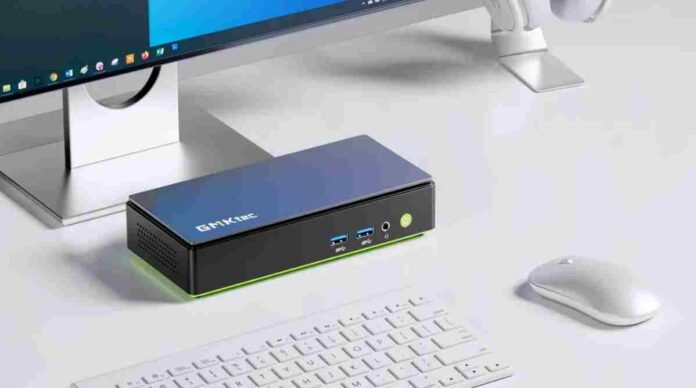
- Dual boot Windows and Ubuntu comes pre configured
- Built in AI tool enables offline model deployment
- Strong specs include Core Ultra CPU and Arc graphics
- Thermal performance and security remain open concerns
GMKtec is pushing its compact desktop lineup forward with the updated NucBox K13, a mini PC that arrives with both Windows 11 Pro and Ubuntu pre-installed. While dual-boot systems are nothing new, what makes this device stand out is how it removes the usual friction.
There is no need to partition drives, hunt for drivers, or spend hours configuring two operating systems to coexist. It is ready to go from the moment you power it on.
This approach feels aimed squarely at developers and power users who often juggle multiple environments. Windows continues to dominate productivity and enterprise workflows, while Ubuntu remains a go-to for open-source development, scripting, and AI experimentation. Having both available instantly lowers the barrier for switching contexts and testing across platforms.
That said, convenience on paper does not always translate into seamless long-term performance. Dual-boot systems can still run into stability quirks depending on how resources are shared and how frequently users switch between environments. Real-world testing will ultimately decide how smooth this experience truly is.
Built for AI workloads but not without concerns
A major highlight of the NucBox K13 is its built-in AI focus. GMKtec bundles support for OpenClaw, a tool designed to deploy AI models locally in minutes. The promise here is simple but appealing. Instead of relying on cloud infrastructure or complex setups, users can run AI workloads offline with minimal effort.
For developers and enthusiasts, this could significantly speed up experimentation. Tasks that previously required lengthy installations and configuration could be reduced to a few clicks. The system is rated at up to 115 TOPS of AI compute, which suggests it is capable of handling demanding inference tasks locally.
However, the excitement around OpenClaw comes with a degree of caution. There have been reports of vulnerabilities and misuse, including its role in distributing malicious code through repositories. Even Microsoft has advised against running such tools in typical environments without proper safeguards.
This raises important questions about security, especially for users who may not fully understand the risks of deploying powerful AI tools locally.
Compact power with surprising specs
Under the hood, the NucBox K13 packs an Intel Core Ultra 7 256V processor with eight cores and boost speeds reaching 4.8GHz. This is paired with an Intel Arc 140V GPU, which GMKtec claims delivers performance comparable to entry-level discrete graphics cards.
The hardware configuration looks solid for a system of this size. It includes 16GB of LPDDR5X memory and dual M.2 slots supporting up to 16TB of storage. That level of expandability is unusual for a mini PC and gives it an edge for users dealing with large datasets or media files.
Connectivity is another strong point. The device supports WiFi 6E, a 5Gbps Ethernet port, and multiple USB options including USB4. It can also drive up to three 4K displays, making it suitable for multitasking setups, content creation, or even compact workstation use.
Despite these strengths, the compact chassis raises a familiar concern. Thermal management in small systems is always a challenge. Sustained workloads, particularly AI processing or heavy multitasking, could push the limits of cooling and impact performance consistency over time.
A niche device with broad appeal
The NucBox K13 is clearly targeted at a specific audience, but its versatility gives it wider appeal. Developers benefit from the dual operating systems, AI enthusiasts gain access to local model deployment, and content creators can take advantage of multi-display support and solid graphics capabilities.
At a price point of around 720 dollars, it positions itself as a premium mini PC rather than a budget option. Buyers are paying for convenience, flexibility, and emerging AI capabilities packed into a small footprint.
Still, it is not without its uncertainties. The real test will be how well it handles sustained workloads, how stable the dual-boot setup remains over time, and whether the included AI tools prove reliable and secure enough for everyday use.
Follow TechBSB For More Updates

