
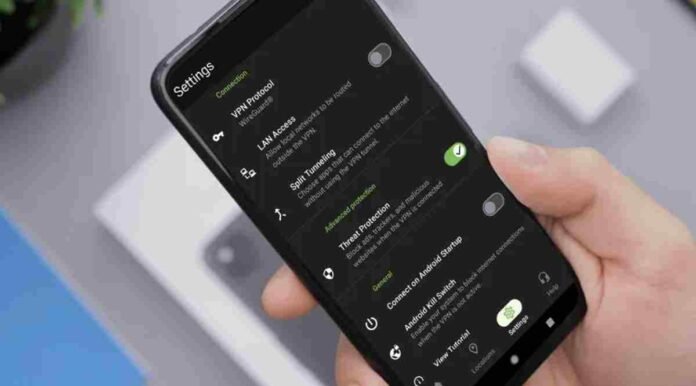
- Threat Protection blocks ads, trackers, and malicious websites at DNS level
- It works across apps and devices, not just inside a browser
- Included with Essential and Advanced plans, with Pro offering always on desktop protection
- Helps improve speed, privacy, and defence against phishing and malware
Built into the wider VPN package from IPVanish, Threat Protection is designed to go further than simple encryption. While a VPN hides your IP address and secures your data in transit, this feature actively filters out the junk and risks that clutter today’s internet.
Think intrusive ads, invisible trackers, and outright malicious websites. Instead of just shielding your connection, Threat Protection works behind the scenes to stop harmful domains from loading in the first place. The result is a cleaner, faster, and safer browsing experience across your devices.
It is a natural evolution for a modern VPN. Basic encryption is no longer enough. Users expect layered protection that tackles privacy, security, and usability all at once. Threat Protection is IPVanish’s answer to that demand.
How Threat Protection Keeps You Safer Online
At its core, Threat Protection blocks three main online annoyances and dangers.
First, ads. Online ads do more than clutter your screen. They slow page loading times, consume mobile data, and can even serve as gateways for malicious scripts. By blocking them at a deeper level, Threat Protection improves both performance and security.
Second, trackers. Many websites deploy tracking scripts that quietly monitor your behaviour. These trackers build profiles about your browsing habits, often without clear consent. By stopping these requests at the DNS level, IPVanish reduces the amount of personal data shared with third parties.
Third, malicious websites. Phishing pages, scam portals, and malware distribution sites remain common threats. Threat Protection checks domains against known risk sources and blocks access before your device connects. That means fewer chances of accidentally downloading harmful files or handing over sensitive information.
The difference here is where this filtering happens. A traditional ad blocker works inside your browser. Threat Protection operates at DNS level. This means it covers more than just Chrome or Safari. It extends across apps and games, offering broader protection on compatible devices.
What Devices and Plans Support It
Threat Protection is available across the full IPVanish ecosystem. That includes Windows and Mac desktops, Android and iOS devices, Amazon Fire TV, and even newer platforms such as Apple Vision. Once enabled in the app settings, it runs automatically while your VPN is connected.
Both the Essential and Advanced subscription plans include standard Threat Protection. It does not matter whether you choose a monthly, annual, or two year plan. The protection remains part of the package.
For those who want an extra layer, there is Threat Protection Pro. Currently in beta and available on Windows and Mac, this upgraded version adds always on protection. Even if you disconnect from the VPN, it continues blocking malicious websites, harmful downloads, ads, and trackers.
Powered by an enterprise grade antivirus engine, Threat Protection Pro focuses on proactive defence. It aims to stop threats before they execute, rather than reacting after damage is done. For users who want continuous coverage on desktop, this adds meaningful reassurance.
How It Compares to a Regular Ad Blocker
Many people already use browser extensions to block ads. So why consider something built into your VPN.
The answer lies in scope. Browser extensions are limited to the browser where they are installed. They do not filter traffic from standalone apps, streaming platforms, or background services.
Because Threat Protection works at DNS level, it filters requests across the entire device while the VPN is active. That means protection is not tied to a single app. It is part of your network layer.
This broader coverage can also reduce system strain. Instead of stacking multiple browser extensions and security tools, you manage everything inside the IPVanish app. A single toggle under Advanced Protection activates the feature.
Beyond Threat Protection, IPVanish includes other security tools such as Double Hop routing, a kill switch, split tunnelling, and DNS leak protection. Together, they form a more complete privacy toolkit rather than a one dimensional VPN.
Follow TechBSB For More Updates

